
Pexels Stock Photos
Pexels is a library of free stock photos. You can search it from BrandCast and import photos straight into your library, with no Pexels account.
Importing a photo
Section titled “Importing a photo”- Go to Content > Assets and click Add.
- Click Import from Pexels.
- Type what you’re looking for, such as “coffee” or “summer”, and press Search.
- Click the import icon under a photo. It’s copied into your library.
- Import as many as you like, then click Close.
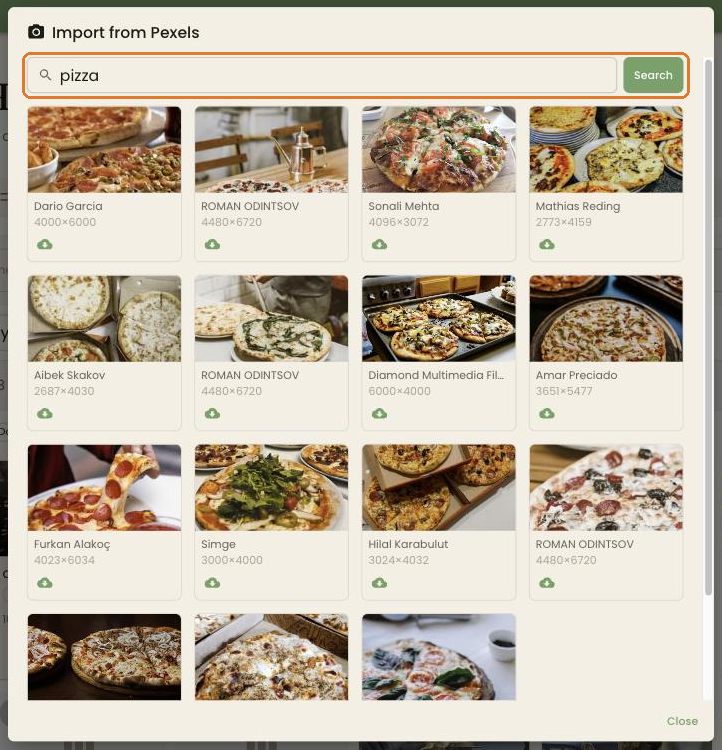
Each search shows up to 15 photos. Each result shows the photographer’s name and the photo’s size. Click a photo to open it on Pexels.
Using the photos
Section titled “Using the photos”Imported photos are ordinary images in your library. Use them in slideshows, as an image on a Page, or as a background.
Pexels photos are free to use, including commercially, under the Pexels license. The license doesn’t cover showing identifiable people in a way they wouldn’t agree to, or implying that a brand in a photo endorses you.
Troubleshooting
Section titled “Troubleshooting”No results. Try a broader or different word.
Search fails with a quota message. BrandCast can only make a limited number of Pexels searches each hour. Wait a while and search again.
I imported the same photo twice. BrandCast notices an identical photo and doesn’t store a second copy.