
Invoices and billing history
Every charge, whether for your Pro subscription, AI credits, storage, or hardware, has an invoice. You find them all in Billing History at the bottom of the Billing tab.
Find your invoices
Section titled “Find your invoices”- Click Account in the sidebar, then Billing.
- Scroll to Billing History.
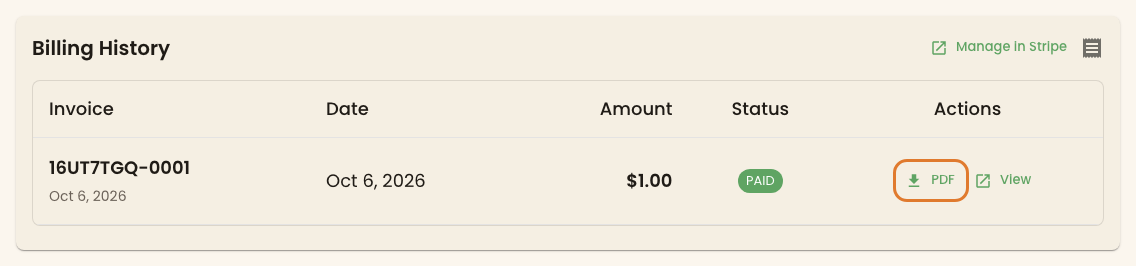
Each row shows the invoice number, the date, the amount, and its status, such as PAID or OPEN. In Actions:
- PDF downloads the invoice as a PDF.
- View opens the invoice on Stripe, where you can also download a receipt.
Before your first charge the table says No invoices yet. On monthly Pro, the first invoice comes at the end of your first paid month, after the 30-day trial.
Stripe also emails a receipt to your billing email after each payment. To change that address, see Payment methods.
What’s on an invoice
Section titled “What’s on an invoice”| Invoice | What it covers |
|---|---|
| Pro subscription | Your displays for the month, or for the year on annual |
| Equipment purchase | The AI credits, storage, or hardware in one checkout |
| Storage overage | Storage you used beyond your quota last month, at $1 per GB |
Sales tax is shown as its own line where it applies.
Storage overage invoices
Section titled “Storage overage invoices”On Pro, uploads aren’t blocked when you go over your storage quota. Instead, at the start of each month you get a separate invoice for the extra storage at $1 per GB. These rows carry a Storage Overage tag. View Overage History on the Storage Usage card takes you straight to Billing History. To avoid overage charges, buy storage ahead of time. See AI credits and storage.
In Stripe
Section titled “In Stripe”Manage in Stripe, above the table, opens Stripe’s billing page. Its Invoice history lists the same invoices, with a search box.
Something looks wrong
Section titled “Something looks wrong”- An amount is higher than expected. Monthly Pro bills the most displays you had during the month, not the number you have today. Open the invoice with View to see the lines.
- An invoice is missing. If you’re still in your trial, you haven’t been billed yet. Otherwise check Stripe’s billing page, then ask Twig or contact support.